
In this tutorial, we are going to show you how to make CRUD Application Laravel 9 framework. We will explained you step by step, how can we perform CRUD Operation in Laravel 9 Framework. So if you beginner in Laravel framework then this tutorial will help you to build CRUD Application in Laravel 9 framework, and you will be able to create Laravel 9 CRUN Application. Here under this tutorial, we will use basic example to show you CRUD Operation in Laravel 9.
Recently Laravel has release Laravel 9 framework and in Laravel 9 framework there is several new features and LTS Support. Laravel 9 also introduced an Anonymous Sub Migration also and it also resolved migration class name Collison. One more things Laravel 9 framework has been use PHP 8 version and it has been support PHP string function, which are very useful for string operations. There are many new query builder function has been introduced under Laravel 9 framework which will more convenient when you have work with database operation. So you are learn Laravel framework first time then this tutorial will help you to create CRUD (Create, Read, Update and Delete) Operation in Laravel 9 framework.
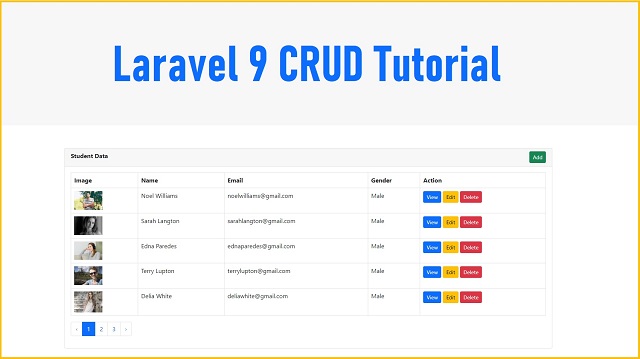
In this tutorial, we will create Student CRUD Application in Laravel 9 framework. Under this CRUD Application we will make Application, in which we can Add new Student Data, with student image upload, edit or change existing student data, with form data validation, show single student data on the web page, delete or remove student data from data and fetch all student data from MySQL database and display on the web page in HTML table format with dynamic pagination link. We will also create table in MySQL database from this Laravel 9 application using Laravel 9 Migration, and after this, we will create Controller, Models and views file for student crud application. Under this Laravel 9 crud application we will use Bootstrap 5 library for design web page. You have to following below steps to create CRUD Application in Laravel 9 framework.
Step 1 – Download & Install 9
In the First Steps of Laravel 9 CRUD Application, we have to download and install fresh Laravel 9 Application in our computer. So for this, you have to goes to command prompt and then after goes into directory where you have run PHP 8 script and then after you have to run following command.
composer create-project --prefer-dist laravel/laravel laravel_9_crud
Once we have run this command then it will create laravel_9_crud directory and under this directory it will download and install Laravel 9 Application.
Step 2 – Make Database Connection
After install Laravel 9 application, first we need to create database connection with MySQL database. So for this we have to open .env file and under this file, we need to add MySQL database configuration like MySQL database name, MySQL database user namd and password details. Once we have define this details, then it will make MySQL database connection in Laravel 9 framework. Below you can find MySQL database configuration details.
.env
DB_CONNECTION=mysql
DB_HOST=127.0.0.1
DB_PORT=3306
DB_DATABASE=testing
DB_USERNAME=root
DB_PASSWORD=
Step 3 – Create MySQL Table using Laravel 9 Migration
Under this step, we have to crate students table under MySQL database from this Laravel 9 Application using Migrations. So first we have to create migration file under Laravel 9 application, so we have to run following command in command prompt.
php artisan make:migration create_students_table --create=students
After run above command then you will find one new file under database/migrations directory. So for we have to open that file and under that file, we have to define following code under that migrations file for create students table in MySQL database.
id();
            $table->string('student_name');
            $table->string('student_email');
            $table->enum('student_gender', ['Male', 'Female']);
            $table->string('student_image');
            $table->timestamps();
        });
    }

    /**
     * Reverse the migrations.
     *
     * @return void
     */
    public function down()
    {
        Schema::dropIfExists('students');
    }
};
After above code in migration file, now for create table in MySQL database from this Laravel 9 application, so for this, we have to run following command in command prompt and it will migrate MySQL table defination to MySQL database and create students table in MySQL database from this Laravel 9 Application.
php artisan migrate
Step 4 – Create CRUD Model and Controller
Under this step, we have to create Controller and Models file for CRUD Operation. So for this, we have goes to command prompt and run following command, which will create new CRUD StudentController and Student Model class file under Laravel 9 framework.
php artisan make:controller StudentController --resource --model=Student
So after run above command it will create Student.php model class file under app/Models directory and we have to open that file and put following code under that file.
app/Models/Student.php
And after run above command it will also create CRUD Controller with name StudentController.php file under app/Http/Controllers directory.
So this StudentController.php file has been created with seven method by default which you can seen below.
- index() - This is root method of this Controller class.
- create() - This is method has been used for load Add student form in the browser.
- store() - This method has been used for handle Add student data request.
- show() - This method has been used for display single student data on the web page.
- edit() - This method has been used for load edit student form in the browser.
- update() - This method has been receive student update form data request.
- destroy() - This method has been used for delete student data from database.
For create CRUD Application, you have to put folliowing code under StudentController.php file.
app/Http/Controllers/StudentController.php
paginate(5);

        return view('index', compact('data'))->with('i', (request()->input('page', 1) - 1) * 5);
    }

    /**
     * Show the form for creating a new resource.
     *
     * @return IlluminateHttpResponse
     */
    public function create()
    {
        //
    }

    /**
     * Store a newly created resource in storage.
     *
     * @param  IlluminateHttpRequest  $request
     * @return IlluminateHttpResponse
     */
    public function store(Request $request)
    {
        //
    }

    /**
     * Display the specified resource.
     *
     * @param  AppModelsStudent  $student
     * @return IlluminateHttpResponse
     */
    public function show(Student $student)
    {
        //
    }

    /**
     * Show the form for editing the specified resource.
     *
     * @param  AppModelsStudent  $student
     * @return IlluminateHttpResponse
     */
    public function edit(Student $student)
    {
        //
    }

    /**
     * Update the specified resource in storage.
     *
     * @param  IlluminateHttpRequest  $request
     * @param  AppModelsStudent  $student
     * @return IlluminateHttpResponse
     */
    public function update(Request $request, Student $student)
    {
        //
    }

    /**
     * Remove the specified resource from storage.
     *
     * @param  AppModelsStudent  $student
     * @return IlluminateHttpResponse
     */
    public function destroy(Student $student)
    {
        //
    }
}
Step 5 - Add Service Provider for Bootstrap Pagination
In Laravel 9 framework produce default style pagination link which will not properly display if you have Bootstrap library. So for this, we have to open app/Providers/AppServiceProvider.php and under this file, we have to add Paginator::useBootstrap() code under boot() method for support the bootstrap pagination.
app/Providers/AppServiceProvider.php
So after adding this code, you Laravel 9 application will display proper pagination link on the web page.
Step 6 - Create Views Blades File
Under this steps, we have to create blades files for display HTML output in the browser. In the Laravel 9 framework, blades files has been stored under resources/views directory. Under this Laravel 9 CRUD Application, we have to create following views blades files.
- master.blade.php - This is master template file.
- index.blade.php - This file we will used for display MySQL table data on the web page in HTML table format with pagination link.
- create.blade.php - This file has been used for load Create Student form on the web page.
- show.blade.php - This file has been used for display single student data on the web page.
- edit.blade.php - This file has been used for load student edit form in the browser.
Below you can find source code of all blade file.
resources/views/master.blade.php
    Laravel 9 CRUD Application


        Laravel 9 Crud Application - Load MySQL Data in HTML Table with Pagination

        @yield('content')
resources/views/index.blade.php
@extends('master')
@section('content')
Student Data
Image
Name
Email
Gender
Action
@if(count($data) > 0)
@foreach($data as $row)
 }})
{{ $row->student_name }}
{{ $row->student_email }}
{{ $row->student_gender }}
@endforeach
@else
No Data Found
@endif
{!! $data->links() !!}
@endsection
Step 7 - Set Resource Route
Under this step, we have to add resource route for student crud application. So for set route, we have to open routes/web.php file and under this file, we have to define resource route for Laravel 9 CRUD Application.
routes/web.php
After adding above code, then it will set route for all method of StudentController.php file.
Step 8 - Run Laravel 9 CRUD Application
When we have follow all above steps, that means our Laravel 9 CRUD Application is ready for check output in the browser. So for check output in the browser, first we need to start Laravel 9 Application server, so for this, we have go to command prompt and run following command.
php artisan serve
So this command will start Laravel server and provide us base url of our Laravel 9 CRUD Application. So we have goes to browser, and type give below URL and view output of Laravel 9 CRUD Application.
http://127.0.0.1:8000/students
So this is complete step by step tutorial on Laravel 9 CRUD Application, so you have follow all above steps then you can able to learn How to perform Insert, Update, Delete and Read MySQL Data Operation in Laravel 9 framework and build CRUD Application Laravel 9 framework with MySQL database and Bootstrap 5 Library.
In this tutorial, we are going to show you how to make CRUD Application Laravel 9 framework. We will explained you step by step, how can we perform CRUD Operation in Laravel 9 Framework. So if you beginner in Laravel framework then this tutorial will help you to build CRUD Application in Laravel 9 framework,…
laravel,this,and,Add,crud,data,database,delete,edit,fetch,insert,laravel,laravel 9,laravel 9 crud,laravel crud,laravel tutorial,mysql,pagination,read,remove,tutorial,update,upload





0 Comments